EasyPay Enrollment
EasyPay is an interest-free monthly payment plan available to all students who meet the payment-plan criteria regardless of financial need. CCRI offers EasyPay for the Fall, Spring and Summer semesters.
Enroll in Your EasyPay Payment Plan Online
Note that our system is most compatible with Firefox and Google Chrome browsers. Using handheld devices is not recommended when setting up payment plans.
1. Log on to your MyCCRI student self service account


Enter your User Name and Password then click the "Login" button

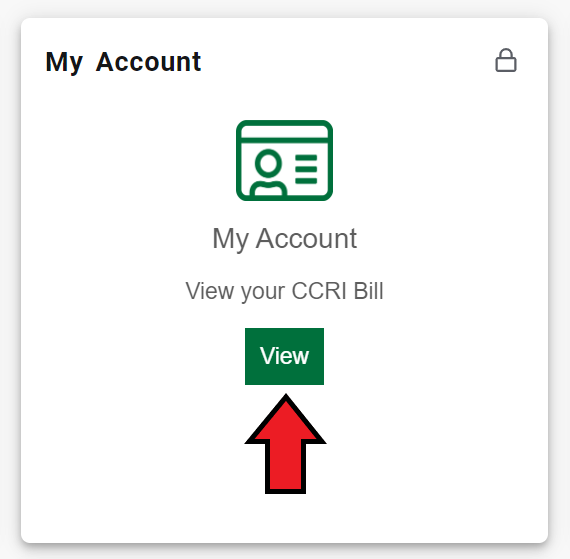
2. Click "View" on the My Account card.
3. Click on the "Enroll In Payment Plan" button

4. Choose the term and click the "Select" button

5. Now choose from the available EasyPay options and click the "Select" button.

6. Here you can choose to add an "Additional Down Payment" and view your "Total Due Now"

Scrolling down you must choose if you would like the payments to be automatically deducted from the same account this first payment will be paid from. Choose "Yes" or "No" and then click the "Continue" button.

7. Now choose your payment method. Previously saved payment methods will appear as an option. If using a saved payment method, please make sure the saved payment method is still valid prior to selection. This will ensure your classes are protected and keep you from receiving any fees that may come from rejected payments.
Click the "Continue" button and fill in the remaining payment information.

8. Scroll down and read the payment plan agreement. To process the payment plan you must check the box that says "I agree to the terms and conditions". Once that box is checked click the continue button.
- Note that clicking "Continue" will process the payment and enroll you in the payment plan.

9. Congratulations! You are now enrolled in CCRI's EasyPay Deferred Payment Program. Adding or dropping classes will result in the remaining payments being adjusted. Emails will be sent to your CCRI email account regarding any changes to your payment plan. It is the student's responsibility to monitor and stay up to date with all required payments.
Have a Question?
Contact the Bursar's OfficeThe staff in the Bursar's Office are highly trained professionals committed to providing efficient, friendly service to the CCRI community.