Verification of Enrollment Process
Verification of Enrollment Process
Please submit all no shows no later than the end of the drop period for the course.
All faculty (including those who have every student attend) should log into their MyCCRI account to verify student attendance.
| Instructions | Screenshots |
|---|---|
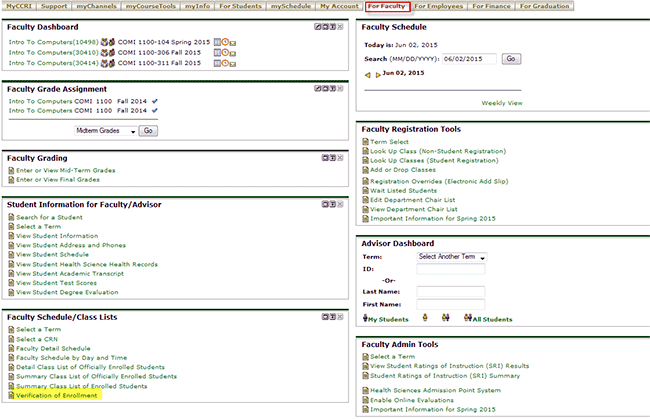
Step 1After logging into your MyCCRI account, click on the For Faculty tab: |
 |
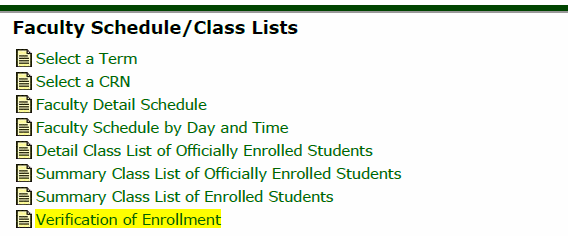
Step 2In the Faculty Schedule/Class Lists Channel, click on the Verification of Enrollment link. |
|
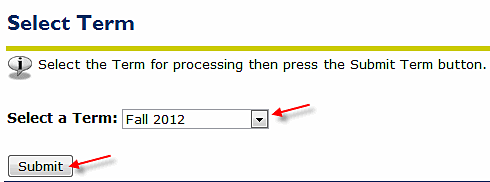
Step 3Select the appropriate term from the drop down list and click Submit |
 |
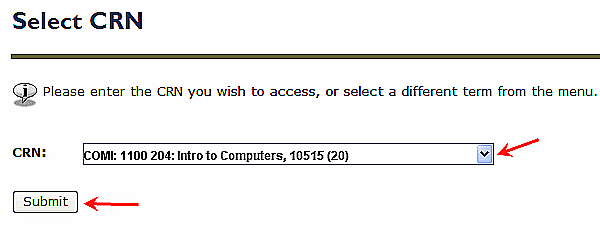
Step 4Select the CRN (for the course) from the drop down list and click Submit |
 |
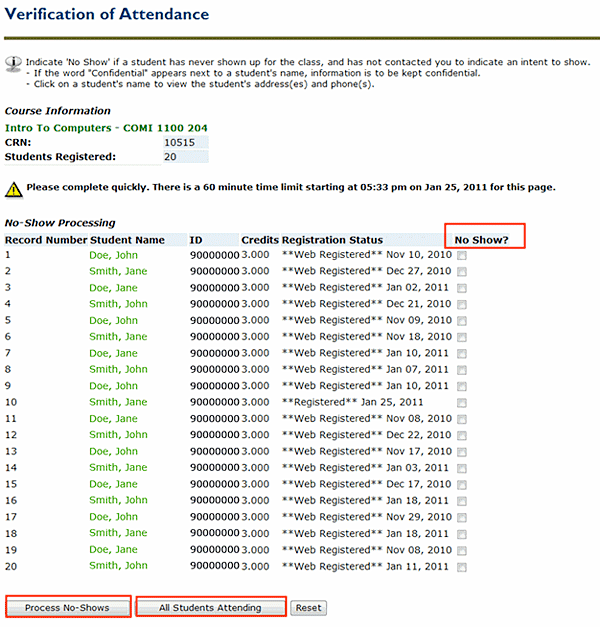
Step 5Enter checkmarks for those students who have never shown up for the class and have not contacted you to indicate an intent to show. Click
the Process No-Shows button. |
 |
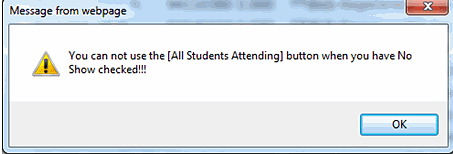 NOTE:if you click even a single checkbox and try to click the All Students Attending button it will not work If you don't click any boxes and press the Process No Shows button you will get a message immediately above the list. It will indicate that You have made no changes to the No Show Processing. No changes were made to the database. |